Did you just write WAEC, NECO, or NABTEB and are wondering how to upload result on JAMB portal? Or maybe you’ve heard about “Awaiting Result” showing in CAPS and now you’re panicking. Relax—we’ve got you covered.
In this step-by-step guide, we’ll walk you through everything you need to know about uploading your O’level or A’level result to the Joint Admissions and Matriculation Board (JAMB) portal in 2025. Whether you’re a UTME or Direct Entry candidate, this article will help you get it right—without confusion or costly mistakes.
Why Uploading Your Result Is a Big Deal
Uploading your O’level (WAEC/NECO/NABTEB) result on the JAMB portal is mandatory for admission into any Nigerian university, polytechnic, or college of education. Why?
Your result helps JAMB determine whether you’ve met the minimum subject requirements for your chosen course.
If you fail to upload your result, your CAPS profile will show “AR” (Awaiting Result), and universities will skip over you during the admission process, no matter your JAMB score.
What You Need Before Uploading Your Result
Before heading to a CBT centre or trying to upload from home, make sure you have:
- Your original WAEC/NECO/NABTEB result or printout.
- A clear scanned copy of the result (JPEG or PDF).
- Your JAMB registration number and profile code.
- A working phone number and email (linked to your JAMB profile).
- About ₦700–₦1,500 for the upload fee.
- Access to a CBT centre or WhatsApp upload service (if doing it from your phone).
Method 1: Uploading Your Result at a JAMB-Accredited CBT Centre
This is the official and most recommended method. Here’s how it works:
Step-by-Step at the CBT Centre:
- Go to any JAMB-accredited CBT centre near you.
- Tell them you want to upload your O’level result.
- Provide your JAMB registration number and original result.
- Pay the service fee (usually between ₦700–₦1,500).
- The CBT officer will:
- Log into your e-Facility profile.
- Fill in your exam details (exam type, year, exam number).
- Upload the scanned result.
- Ask for confirmation or a printout as proof of upload.
- Go home and check your CAPS profile in 24–48 hours.
Pro Tip: Don’t wait till the last minute—upload early before the admission rush begins.
Method 2: Uploading Your Result Using Your Phone (WhatsApp Agent Method)
This option has become popular in recent years, especially when CBT centres are crowded or far away. But it’s unofficial—so proceed with caution.
How It Works:
- Save the WhatsApp number of a verified result-upload agent (e.g., 08164595198).
- Send a clear photo or scanned copy of your O’level result.
- Provide your:
- JAMB registration number
- Full name (as on your JAMB profile)
- Exam type (WAEC/NECO) and year
- Make payment via transfer (usually ₦1,000–₦1,500).
- Wait 5–20 minutes for confirmation.
- Check your CAPS profile afterward to ensure it reflects.
Note: This method is convenient but risky. Only use trusted agents. JAMB doesn’t officially endorse this method.
How to Upload Result on JAMB Portal Yourself (If You Have Access)
While uploading directly from home is restricted to CBT centres, here’s how it works if you have access through an insider or technician:
Step-by-Step Process:
- Visit https://efacility.jamb.gov.ng
- Log in using your email and password.
- Go to your dashboard and click “Upload O’level Result”.
- Fill in:
- Exam Type (WAEC/NECO/NABTEB)
- Exam Year
- Exam Number
- Upload the scanned result image (PDF or JPEG only).
- Submit and wait for a confirmation message.
How to Confirm if Your Result Was Successfully Uploaded
To avoid stories that touch, always check if your upload was successful. Here’s how to verify on CAPS:
Steps to Confirm:
- Visit https://efacility.jamb.gov.ng
- Log in to your profile.
- Click “Check Admission Status”.
- Tap “Access My CAPS”.
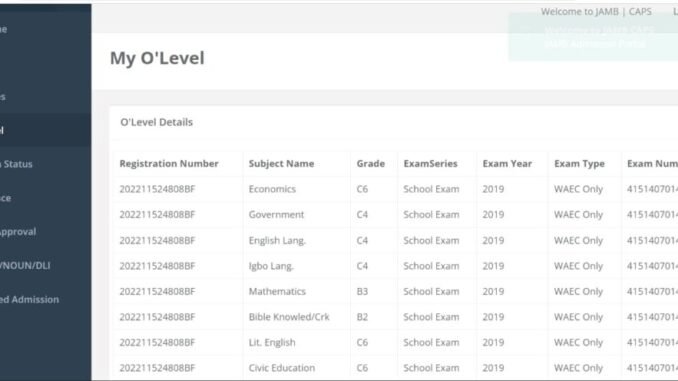
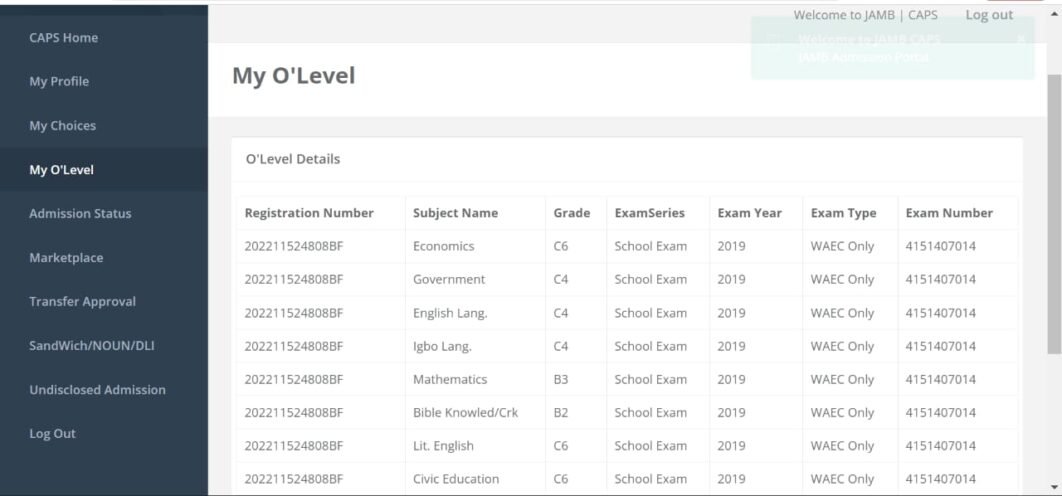
- Select “My O’Level” from the menu.
- If your result shows your 5 core subjects and grades, it worked!
- If it still says “AR” (Awaiting Result), go back to the CBT centre or re-upload.
Common Problems & How to Fix Them
Uploading your result is usually smooth, but here are common issues students face—and how to fix them:
Still Showing “AR” on CAPS
- Fix: Wait up to 48 hours. If it still shows “AR,” revisit the CBT centre or contact JAMB support.
Wrong Exam Details
- Fix: Ask the CBT staff to delete and re-upload using correct exam year/type/number.
Paid an Agent, No Upload Done
- Fix: Confirm upload via CAPS. If nothing shows after 24 hours, demand a refund or report the agent.
Combined Results (Two Sittings)
- Fix: Make sure the CBT staff selects “TWO SITTINGS” during upload. Upload both result documents.
When Is the Deadline to Upload Result on JAMB Portal?
There’s no official fixed deadline from JAMB. However, your result must be uploaded before your school begins admission screening—typically around August to October for most institutions.
Reminder: If you used “Awaiting Result” during registration, you must upload your result once it’s out—or risk losing your admission slot.
FAQs About Uploading Results on JAMB Portal
Can I upload my result twice?
Yes, especially if you made a mistake during the first upload or now have your complete result.
Can I upload it myself at home?
No. Direct upload is restricted. You must go through an accredited CBT centre or a reliable online agent.
Can I combine WAEC and NECO?
Yes. Choose “Two Sittings” and upload both documents.
Can I upload my A’level result for Direct Entry?
Absolutely. You’ll follow the same process via a CBT centre.
Final Thoughts: Don’t Delay Your Upload!
Uploading your result to the JAMB portal is non-negotiable if you want to secure admission in 2025. Whether you go the traditional CBT centre route or use a trusted WhatsApp agent, make sure your CAPS reflects your result before your school releases the admission list.
Double-check. Re-upload if necessary. And keep your confirmation handy.
Leave a Reply